Learning Genie for Parents
- 4.9
- Rating
- 100.00K
- Installs
- Free
- Price

 Analysis by App-foxy
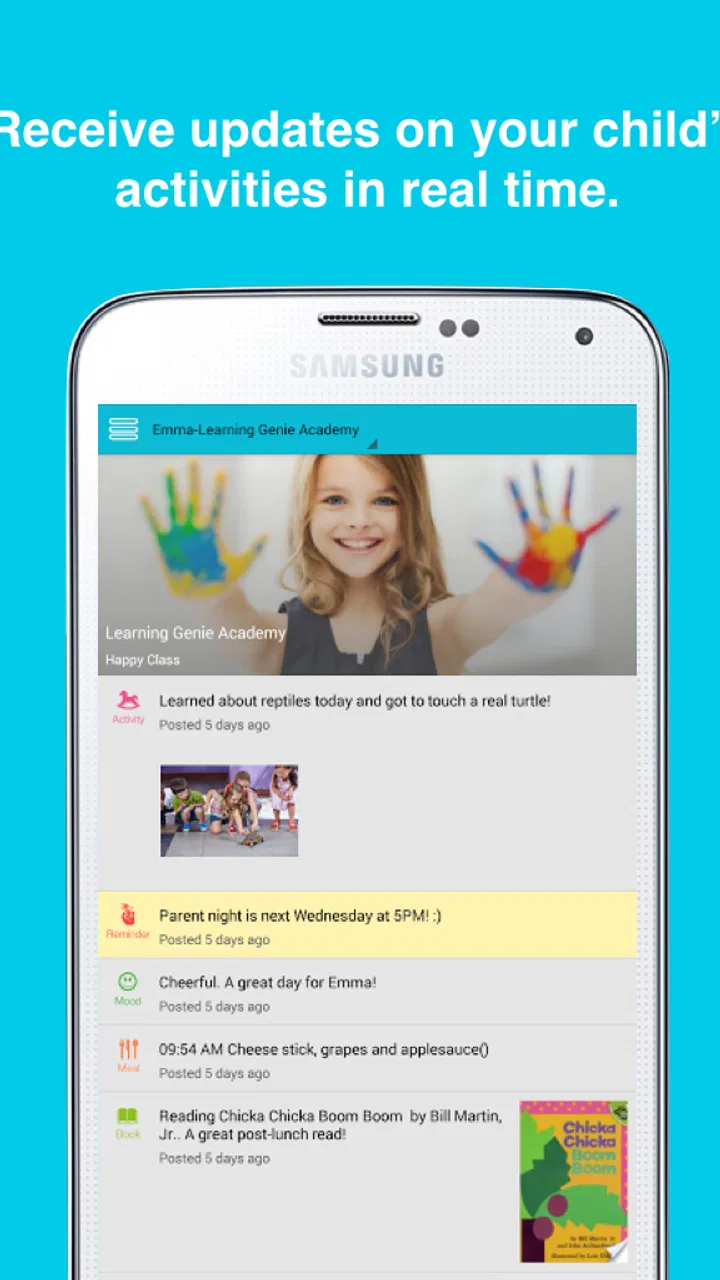
Learning Genie for Parents is an education app aimed at keeping families connected to a child’s early-learning experience. I see it as a parent-facing companion rather than a teaching game or a replacement for classroom communication. Its focus is practical: helping parents follow what is happening through photos, daily reports, and related updates from their child’s learning environment.
That distinction matters. If you want lessons that your child can complete independently, this is probably not the right kind of app. If you want a simple way to stay involved in everyday preschool or early-learning activity, it has a much clearer purpose. I found the experience most useful when treated as a regular check-in tool, not something to open constantly throughout the day.
How the app fits into a parent’s routine
Learning Genie for Parents comes from Learning Genie Inc and sits in the education category. It is free, carries an Everyone age rating, and has been available since October 16, 2014. The current version is 5.0.29 and works on Android devices using Android 5.0 or later. Those details make it accessible to families using older compatible phones, although the quality of the experience will still depend on the device, its connection, and how actively the child’s learning provider uses the service.
You May Also Like

 Blood Strike: 2.5 Anniversary
Blood Strike’s Loadouts Turn Every Drop Into a Tactical Gamble
A close look at Blood Strike’s custom loadouts: how fast access to signature weapons reshapes its battle royale rhythm, rewards preparation, and narrows the gap between fights.

 Pandora - Music & Podcasts
Pandora’s Music Is Easy to Start, but Harder to Recover
Pandora’s strength is its low-effort path from a seed to a station. Its weak spot is how much confidence it asks you to place in connection, setup, and quiet recovery.

 8 Ball Pool
 Is Built on Rivalries, Rematches, and Routine
A close look at the rivalries, rematches, shared routines, and unanswered safety questions that turn a quick pool match into a persistent mobile community.

 Samsung Music
’s Quiet Strength Is Playing What You Already Own
Its reach comes less from spectacle than from dependable access to a personal library. That simplicity is both the app’s strongest retention engine and its ceiling.

 AccuWeather: Weather Radar
AccuWeather Review: A Quick, Clear Forecast for Everyday Decisions
For everyday plans, the best forecast is the one you can understand quickly. AccuWeather makes rain timing, radar, and local conditions easy to act on, with a few trade-offs.

 Hill Climb Racing
Why Hill Climb Racing Still Turns Crashes Into One More Run
A tiny car, a bumpy hill and one more upgrade: Hill Climb Racing keeps resurfacing because its simple chaos makes every near-miss feel personal.
More From Our News Desk



The app’s strongest idea is continuity. A child may spend much of the day in an early-learning setting while a parent is at work, commuting, or handling household responsibilities. Photos and daily reports create a small bridge between those two parts of the day. Instead of relying entirely on a hurried conversation at pickup, I can use the app to get a more concrete sense of what my child experienced.
That does not mean every update will be equally meaningful. A photo can show participation, but it may not explain what the child was learning or how they responded. A daily report can provide useful context, but parents still need to read it carefully rather than treating it as a complete account of the day. The app works best when it supports a conversation with the educator and the child, rather than replacing either one.
One practical habit is to check updates at a calm point in the day instead of opening the app repeatedly. I would look after work or before dinner, note anything that deserves a follow-up question, and then ask the child about one specific detail. That turns a digital update into a real family conversation. It also prevents the stream of information from becoming background noise.
Where connectivity changes the experience
Because the app centers on photos and daily reports, the network becomes part of the experience. A new update is useful when it arrives at the moment a parent can actually view it, but the experience can feel less immediate when the connection is weak or inconsistent. A photo may take longer to appear, or a report may be easier to read later when the phone has a stronger connection.
This is especially noticeable in everyday mobile situations. Imagine leaving work and checking the app while walking toward public transport. If the connection is unstable, that is not the ideal moment to review a detailed update. I would wait until I am somewhere with a more reliable connection rather than repeatedly refreshing and assuming the content failed to arrive.
The same applies at pickup. Parents often want to look at an update while moving between places, but a busy environment, limited signal, or a congested mobile connection can make that frustrating. In my view, the app is better suited to a deliberate check-in than to instant, uninterrupted access during every transition in the day.
Connectivity also affects emotional timing. A positive photo or thoughtful report can help a parent feel involved, but delayed access can make the app seem less responsive than it really is. I would avoid judging the whole service from one slow loading moment. First, I would check whether other apps are also struggling, then try again later before assuming the update itself is missing.
Using it on a phone without creating extra work
The mobile format makes sense for parents because the phone is usually close at hand. I can check a report while taking a short break, review a photo before discussing the day with my child, or use an update as a reminder to ask the educator a more precise question. Those small moments are where the app feels most natural.
There is a trade-off, though. Phone-sized content encourages quick glances, while early-learning updates often deserve more attention than a notification-style scan. If I read too quickly, I may notice the image but miss the educational or behavioral context around it. My better approach is to separate the first glance from the proper review: see that something new is available, then return when I can focus.
Families sharing responsibility for a child should also agree on how they use the information. One parent might check every update while another assumes the first parent will pass everything along. That can lead to missed details or duplicated questions. A simple routine, such as deciding who reviews updates on weekdays and who discusses them at home, makes the app more useful without requiring constant attention.
Another useful habit is to treat photos as conversation starters, not as a performance report. Asking “What were you doing with those blocks?” is more helpful than asking whether the child was “good” because they appeared happy in an image. The app can show a moment, but the parent’s response determines whether that moment becomes meaningful learning at home.
For grandparents or other caregivers, the value depends on how information is shared within the family. A parent can use a daily report to keep another caregiver informed, but the app should not become a source of pressure to respond immediately. Early-learning communication is most helpful when it reduces uncertainty, not when it adds another stream of obligations.
What happens when an update does not appear smoothly
Any app built around current reports and images has a natural point of friction: the parent expects to see something, but the screen does not behave as expected. The first response should be simple. I would confirm that the phone has a working connection, reopen the app, and give the content a little time before trying more complicated fixes.
If the same problem continues, I would avoid repeatedly tapping the same control. Repeated attempts can make it harder to tell whether the issue is the network, the app, or the device. Instead, I would make a note of what happened, such as whether text appeared but an image did not, and contact the child’s learning provider if the issue concerns a particular report. That distinction helps the right person investigate it.
Parents should also keep a sensible boundary around the app’s role during an urgent situation. A delayed report is not a substitute for direct contact when a child’s immediate wellbeing is involved. The app is designed for ongoing engagement with early learning, not for handling every time-sensitive concern. That may sound obvious, but connectivity problems are most stressful when users expect one tool to cover every kind of communication.
Recovery is easier when I do not rely on a single update as the only record of the day. If a report is temporarily unavailable, I can still ask the child what they remember, speak with the educator, and return to the app later. This approach avoids turning a technical interruption into a larger family worry.
It is also worth keeping the app and the phone in a practical state. Older compatible devices may handle basic use adequately, but limited storage, an outdated operating environment, or many demanding apps running at once can make any media-focused experience feel slower. I would keep enough room for normal phone operation and install updates when appropriate, while remembering that technical maintenance cannot solve a weak network connection.
Being thoughtful about mobile data
Photos naturally require more data than short text, so parents using a mobile connection should be selective about when they browse a large set of updates. I would prefer a dependable Wi-Fi connection for a longer review, especially when I am catching up after being away from the app for a while. For a quick text check, mobile data may be perfectly practical, but I would avoid assuming that every session has the same cost or speed.
This is less about avoiding the app and more about matching the habit to the connection. A parent with a generous data plan may not need to worry much, while someone sharing a limited plan should make photo-heavy browsing a planned activity. The app’s value does not require constant refreshing, so a once-or-twice-daily routine can be both calmer and more data-conscious.
Notifications, when available through the device and app setup, can also change how often a parent opens the app. I would keep alerts useful rather than allowing every small prompt to interrupt work or family time. The best notification is one that reminds me to check meaningful information; too many interruptions can make an otherwise helpful tool feel demanding.
There is a privacy dimension to mobile use as well. A photo or report may appear on a lock screen, in a shared family space, or while another person is looking over my shoulder. I would review the phone’s notification display settings and think about where I normally check updates. That is a general smartphone precaution, but it matters more when the content concerns a child.
For families with several caregivers, data-conscious use also means avoiding unnecessary duplicate browsing. If one person has already reviewed the day’s updates, they can summarize the important point to another caregiver rather than everyone repeatedly opening the same media. That does not reduce involvement; it makes involvement more intentional.
How it compares with ordinary alternatives
The usual alternative is a conversation at pickup, a paper note, a phone call, or a message from the learning provider. Those methods can be more immediate when something important needs explaining, and a direct conversation allows a parent to ask questions in real time. Learning Genie for Parents is more useful for maintaining a visible thread of everyday participation, particularly when a photo or written report adds detail that a rushed handover might miss.
It is also different from child-focused learning apps. Those products usually ask the child to tap, practice, watch, or complete an activity. This app is aimed at the parent’s awareness of early learning, so comparing it with a phonics game or a math practice tool would be unfair. If your goal is independent screen-based practice, choose a purpose-built learning activity instead. If your goal is to understand what happens during the child’s day, this app has the more relevant design.
A general messaging app may feel more flexible because families already know how to use one. However, ordinary messaging can scatter photos, questions, and updates across personal conversations. A dedicated parent-facing education app can make that communication feel more connected to the child’s learning context. The trade-off is that its usefulness depends heavily on the learning provider’s participation and the quality of the updates being shared.
I would also not choose it as my only tool for detailed developmental tracking unless the reports provided are sufficiently informative for that purpose. A parent who needs extensive records, formal progress analysis, or a broad home-learning curriculum may prefer a more specialized platform. Learning Genie for Parents is strongest as a communication layer between home and early learning, not as a complete educational management system for the family.
Who will get the most from it
The app is a good match for parents of young children who want more insight into the day than a brief pickup conversation can provide. It is particularly useful for working parents, families with changing schedules, and caregivers who cannot always be present when the child leaves the learning setting. Photos and daily reports can make the child’s experience easier to discuss at home.
It can also help a parent notice patterns in conversation. One update may prompt a question about friendships, another about creative play, and another about a new routine. Over time, those small prompts can help the parent become more specific and engaged without turning the evening into an interrogation.
I would be more cautious about recommending it to someone who wants a fully interactive app for the child. The store summary describes parent engagement through photos and daily reports, and that is the lens through which I would judge it. It is not the best choice for a child who needs an offline activity during travel, a structured lesson plan at home, or a game-like reward system.
Its audience rating of Everyone makes the app broadly approachable from an age-classification perspective, but the practical user is still the parent or caregiver. That distinction is important: a child may appear in the content, yet the app’s value comes from the adult interpreting and using the information responsibly.
What the adoption numbers suggest, and what they do not
Learning Genie for Parents has a 4.9 average from around 1.6 thousand ratings, with more than 300 written reviews and over 100 thousand installs. Those figures show that the app has found a real audience and that user sentiment is very positive overall. I would take that as encouragement, not as a guarantee that every family will have the same experience.
For this type of app, satisfaction depends on more than the software itself. The frequency, clarity, and usefulness of the updates come from the relationship between the parent and the child’s learning provider. A beautifully organized app cannot compensate for sparse communication, while a simple workflow can feel excellent when educators share thoughtful, timely information.
The free price removes one obvious barrier to trying it. That makes it easier for a parent to see whether the app fits the family’s routine before committing time to it. Still, “free” does not mean costless in a broader sense: attention, mobile data, notifications, and the effort of following up on updates all shape the real value.
My connectivity verdict
My overall view is positive, with a clear condition: Learning Genie for Parents works best when the family has a dependable way to access updates and the learning provider uses the communication channel consistently. Its strength is not entertainment or elaborate interaction. It is the simple connection between what happens during early learning and what a parent can understand, discuss, and reinforce at home.
I would install it for a child enrolled in a setting that actively shares meaningful photos and daily reports. I would use it in short, intentional sessions, preferably when the connection is stable, and I would keep direct communication available for questions that need an immediate answer. That approach makes the app feel supportive rather than intrusive.
The most useful mindset is to treat Learning Genie for Parents as a bridge, not a substitute. It can bring a parent closer to a child’s day, but the bridge works in both directions: the app provides context, while conversations with the child and educator provide meaning. For families looking for that kind of connection, this free education app is a sensible and accessible choice. For anyone seeking a standalone learning game, a complete progress-tracking system, or guaranteed access in every mobile situation, a different tool will be a better fit.
FAQs for Learning Genie for Parents
01What is Learning Genie for Parents used for?
Learning Genie for Parents is a family communication and learning app designed to help parents stay connected with their child’s early education or childcare program. After joining through an affiliated school or provider, parents may receive announcements, classroom updates, photos, videos, learning observations, messages, and activity information in one place. Available features can vary depending on the provider’s subscription and setup.
02How do parents create an account and sign in to Learning Genie?
Parents generally need an invitation, access code, or registration link from their child’s school, daycare, or childcare provider before they can use Learning Genie. The provider usually connects the child’s profile to the parent’s account. During setup, you may be asked to verify an email address or phone number and create a password. If you cannot register, contact the provider rather than creating an unrelated account.
03Can Learning Genie for Parents be used to communicate with teachers?
Yes, communication is one of the app’s main purposes, although the exact tools depend on the participating program. Parents may be able to exchange messages with teachers or administrators, receive notices, respond to updates, and view information about classroom activities. It is still important to check the app regularly, because urgent matters, attendance issues, or medical concerns may require a phone call or another communication method.
04Does Learning Genie for Parents share photos, videos, or information about my child?
The app may display photos, videos, observations, reports, and other information uploaded by the child’s school or childcare provider. What you can see depends on your permissions and the provider’s privacy policies. Before using these features, review the consent forms and account settings supplied by the program. Parents should also remember that content shared through the app may contain sensitive information and should not be redistributed without permission.
05Is Learning Genie for Parents free to download and available on Android and iPhone?
Learning Genie for Parents is typically available to download from the official Android and iOS app stores, and downloading the app itself may not require a separate payment. However, access is normally tied to a participating school, daycare, or education provider, which may pay for the service or enable specific features. Compatibility, supported devices, and available tools can change, so confirm the current store listing and ask your provider for details.
Pros
- Clear updates help parents follow their child’s classroom progress.
- Messaging keeps communication with teachers organized in one place.
- Photo and video sharing offers useful insight into daily activities.
- Digital forms and signatures can reduce paperwork for families.
- Notifications make it easier to stay informed about important events.
Cons
- Some features depend on the child’s school using Learning Genie.
- Frequent notifications may feel overwhelming without careful settings.
- The interface can take time to learn for less tech-savvy parents.
- Media and messages may use significant mobile data over time.
- App performance can vary depending on school configuration and device.

Learning Genie for Parents
Gallery